
Your blaster came out of a box with a range cap built into it. 3D printed blasters do not, because nobody designed them to pass a toy safety test. This is the part of the hobby that stopped modding Hasbro shells and started printing better ones.
Here is what that actually involves, what it costs, and where to get the files.
What is on this page
- What a 3D printed blaster actually is
- Why people print instead of modding
- The Caliburn, and why it changed the hobby
- The designs worth knowing
- The printer, and what it has to do
- The parts a printer cannot make
- What it costs to get started
- Safety, and the rules that actually apply
- Where the community lives
- What goes wrong on a first build
- If you are starting this week
- Where to buy the gear
- Frequently asked questions
What a 3D printed blaster actually is
A 3D printed blaster is a foam dart blaster whose shell and internal parts are printed on a desktop 3D printer from files a designer published, then assembled with hardware you buy separately. 3D printed blasters are not modded Nerf blasters. Nothing from Hasbro is involved except, usually, the magazines and the darts.
That last point surprises people. Most 3D printed blasters are designed to feed standard Nerf magazines, because those are cheap, everywhere, and already work. The printed part is everything around them.
3D printed blasters split roughly into two families:
- Springers. A plunger tube, a spring, and a pump or bolt to prime it. Mechanically simple, no electronics, no batteries.
- Flywheelers. Motors, wiring, a battery and a switch, printed around them. More parts to source and more that can go wrong.
Most people start with a springer, and most of the famous 3D printed blasters are springers, for the same reason most people learn to drive on a manual gearbox in a car park: fewer systems failing at once.
Why people print instead of modding
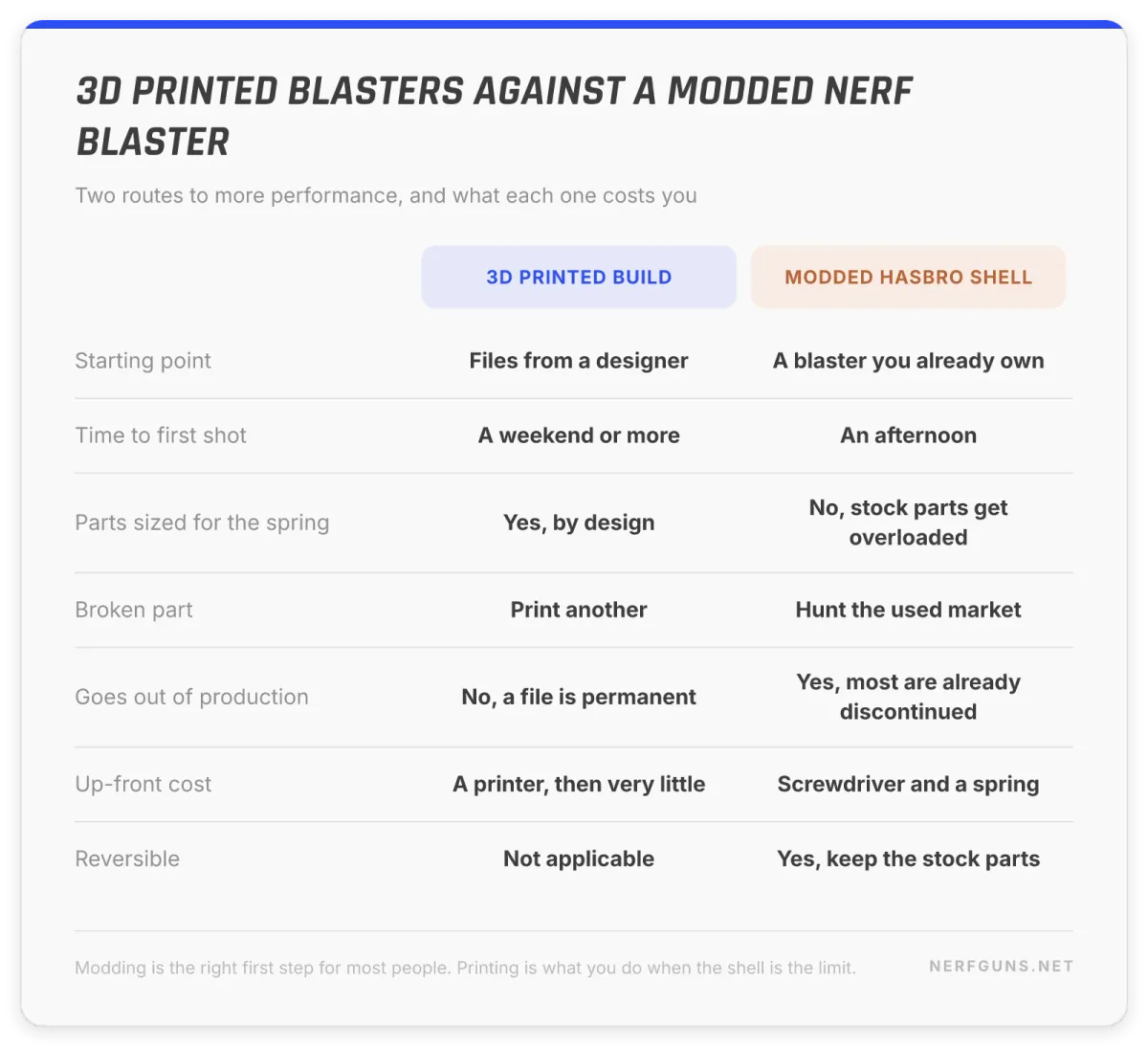
Our Nerf gun mods guide covers getting more out of a blaster you already own, and for most people that is the right answer. Printing is what happens when modding runs out of road.
Modding is limited by the shell you started with. A stock blaster’s plunger tube is a fixed diameter, its stock is glued where it is, and its trigger geometry was designed around a spring half the strength of the one you want to fit. You can fight all of that, or you can print a shell designed for the spring from the start.
Three things 3D printed blasters give you that a modded Hasbro shell does not:
- Parts designed for the load. The most common way a mod fails is a stock part breaking under a stronger spring. Printed designs size their parts for the spring they specify.
- Repairability. Snap a printed part and you print another one. Snap a Hasbro part on a discontinued blaster and you are hunting eBay.
- Nothing is discontinued. Most of the blasters on this site are out of production. A file does not go out of production.
The honest counterweight: a printed blaster is a project, not a purchase. Expect a weekend minimum, and expect the first one to teach you things by going wrong.
The Caliburn, and why it changed the hobby
If you read about 3D printed blasters for ten minutes you will hit the Caliburn. It is a mag-fed, pump-action springer designed by Captain Slug, and its file set was released into the public domain. Not a paid file, not a licence with conditions. Public domain.
That decision is most of why the design spread the way it did. Anyone could print it, anyone could sell printed parts for it, and anyone could remix it, which is exactly what happened: metric conversions, single-piece rail versions, and a long tail of community variants sit alongside the original.
Its own listings describe it as reaching roughly 250 fps while feeding standard Nerf magazines. That figure comes from the design’s published description rather than from our testing, and velocity on any springer depends on the spring you fit, so treat it as what the design is capable of rather than what yours will do.
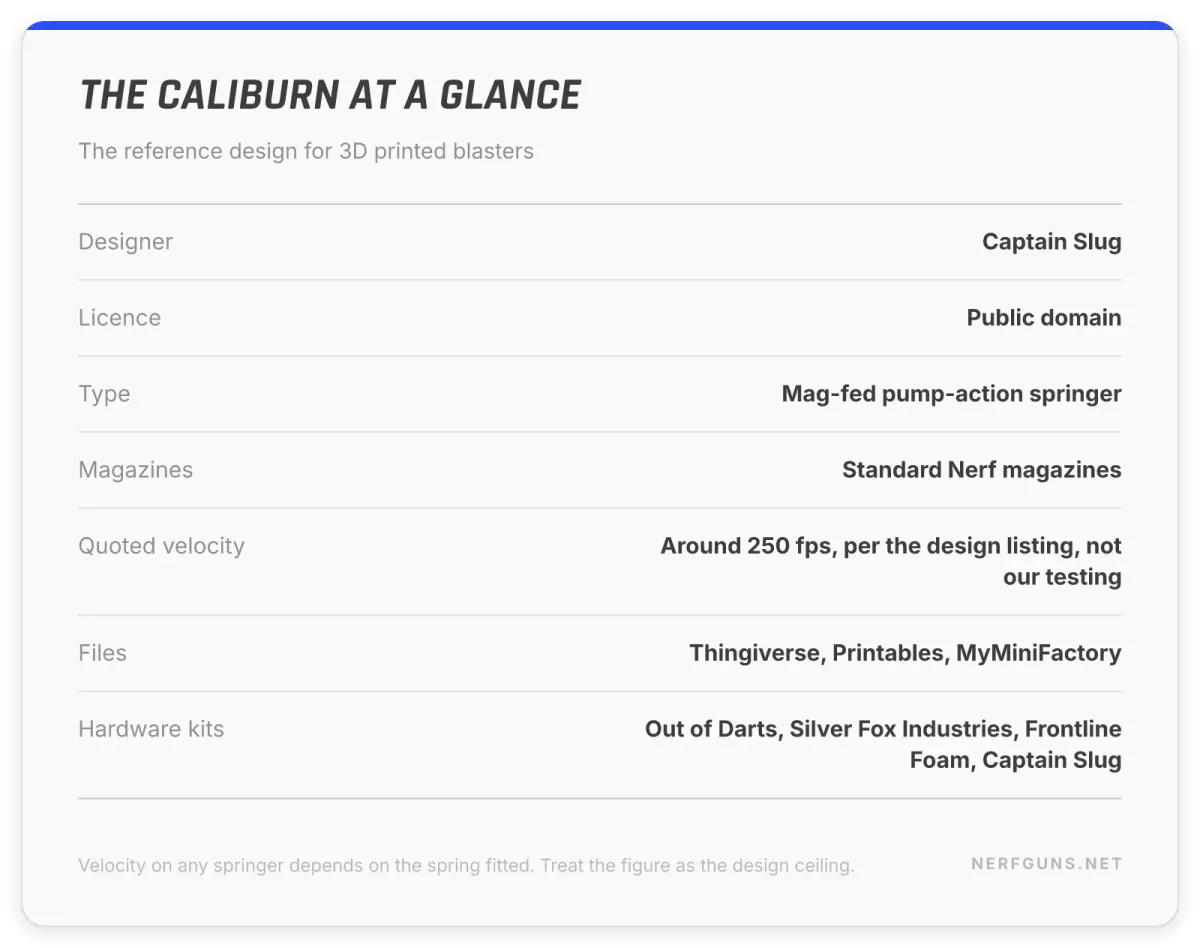
Why it matters even if you never build one: the Caliburn is the reference point everyone else designs against. Understanding it makes every other design on this page easier to read.
The designs worth knowing
You do not need a full catalogue of 3D printed blasters, you need three or four names that come up constantly.
- Caliburn, by Captain Slug. Mag-fed pump-action springer, public domain, the default first serious build. Files on Thingiverse, Printables and MyMiniFactory.
- Talon Claw, also Captain Slug. His other well-known design, from the same background of hand-built PVC blasters before printing was practical.
- FDL (Foam Dart Launcher). A long-running family of designs with many community variants, frequently mentioned alongside the Caliburn.
- Sillybutts designs. A prolific CAD designer with a growing catalogue and an active YouTube presence.
- Charamile Designs (Taffy). Notable because the Skewer design was licensed by Buzz Bee, which is the clearest sign yet that the printed scene now feeds back into the commercial one.
Names matter here more than in most hobbies, because you are downloading engineering from a person rather than buying a product from a company. A design with an active designer and a busy remix page is a design that gets fixed.
The printer, and what it has to do
3D printed blasters ask more of a printer than a desk ornament does. Parts are large, some are structural, and a layer split in the wrong place becomes a failure under spring load.
Out of Darts, which is the closest thing this hobby has to a central shop, names 3 printers it actually runs:
- Bambu Lab A1. Their stated primary workhorse, on speed and price.
- Bambu Lab X1 Carbon. The higher-end enclosed machine, used for temperature-sensitive materials.
- Prusa i3 MK3S. Previously run at scale by them, and now mostly worth knowing as a solid used-market option.
Filament matters as much as the machine. Out of Darts partners with Proto-Pasta, a US manufacturer, and sells it on recyclable cardboard spools. The general rule in this scene is that structural parts want something tougher than basic PLA, and that a design’s own documentation will tell you what it expects.
Read the designer’s notes before you buy material for 3D printed blasters. A design specifying a particular filament for the plunger is not being fussy, it is telling you where the load goes.
The parts a printer cannot make
This is the step that catches people who assume 3D printed blasters means the printer does everything, and it is where first builds stall. It does not. Every serious design has a hardware list, and it usually includes:
- Springs, sized to the design
- Steel rods and bolts for the priming mechanism
- Bearings or bushings
- Screws, in quantity, often a specific length
- O-rings for the plunger seal
- Brass or polycarbonate tube for the barrel on some designs
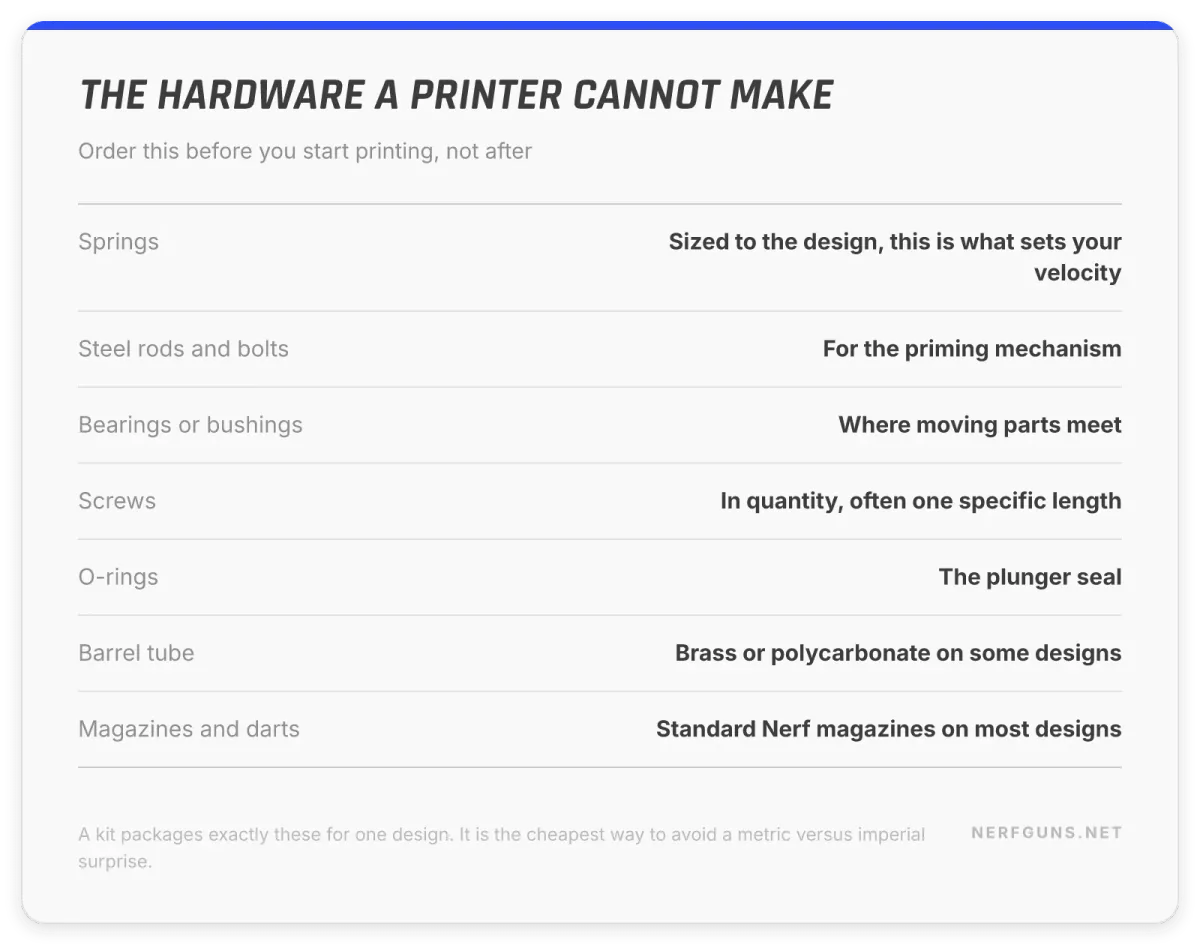
You can source these individually from a hardware shop, and plenty of people do. The alternative is a kit. Several sellers package the exact hardware for a given design, which removes the single most common beginner failure: getting 40 hours into a print and discovering the bolt you need is metric and your shop is imperial.
Kits for the Caliburn specifically are sold by Out of Darts, Silver Fox Industries, Frontline Foam and Captain Slug’s own shop. That is not a recommendation of one over another, it is the list of places the design’s own community points at.
What it costs to get started
Nobody will quote you a straight number for what 3D printed blasters cost, so here is the honest shape of it instead.
The printer is the real cost of 3D printed blasters, and it is a one-time cost. Everything after it is filament and hardware. If you already own a printer, a printed blaster is a cheap hobby. If you do not, the first blaster costs whatever the printer costs, and the second one costs almost nothing.
The rest of the budget looks like this:
- Filament. One blaster is a meaningful chunk of a spool, not a whole one.
- Hardware kit or loose parts. The springs and steel are the bulk of it.
- Magazines and darts. Standard Nerf magazines, which you may already own.
- Time. Print time on a big design runs into days, not hours, and it is the cost people forget.
We are deliberately not printing prices here. Printer prices move constantly and filament is sold a dozen ways, so a hard number on this page would be wrong within a season. Check current pricing before you commit.
Safety, and the rules that actually apply
3D printed blasters routinely outperform anything Hasbro sells, and that is the whole point of them, so the safety conversation is not optional filler.
Eye protection, always, no exceptions. 3D printed blasters earn that rule. A printed springer running a strong spring is not a toy in the way a stock blaster is a toy. Everyone in the room wears eye protection, including the person who is only watching.
Know the field limit before you build for it. Organised Nerf wars almost always publish a maximum fps and chronograph blasters at the door. Building something well over the local limit means building something you cannot use. Find the limit first, pick the spring second.
Treat the appearance question seriously. A printed blaster does not arrive with the bright colours and orange tip that a retail blaster has, and how a blaster looks in public is not a small detail. Keep them looking like what they are, transport them out of sight, and do not carry one in public.
Rules vary by where you live. Out of Darts states plainly that the buyer is responsible for determining whether a product is lawful in their jurisdiction, and that is the correct starting assumption for a printed blaster too. Check your local rules rather than assuming the hobby’s norms apply where you are.
Respect the licences. Most files in this scene are free, and some are public domain, but “free to download” and “free to sell printed copies of” are different permissions. Creative Commons terms vary by design. Read the licence on the file page before you sell anything you printed.
Where the community lives
The single most useful thing about 3D printed blasters is that the people behind them are reachable. Every design named on this page came from someone who publishes, answers questions and gets remixed. Here is where to find them.
| Resource | What it is | What to use it for |
|---|---|---|
| Printables | Free model repository run by Prusa | Current files, active remixes, and the licence terms for each |
| Thingiverse | The older, larger model repository | The original Caliburn uploads and a deep back catalogue |
| MyMiniFactory | Curated model repository | A third mirror when a file has moved |
| NerfHaven | Long-running technical forum | Archived build write-ups and the deepest mechanical discussion anywhere |
| r/Nerf | The main community subreddit | Current questions, build photos, and honest opinions on new designs |
| Out of Darts | The hobby’s main specialist shop | Hardware kits, springs, motors, filament, and printer guidance |
None of the links in this table are affiliate links. They are where the hobby actually is, and they are listed on that basis.
What goes wrong on a first build
Almost every first attempt at 3D printed blasters fails in one of a handful of ways, and all of them are cheaper to read about than to discover.
Layer adhesion in the wrong axis. A printed part is strongest across its layers and weakest between them. Print a plunger rod standing up and it will snap along a layer line the first time it takes a full spring. The designer’s recommended orientation is not a suggestion, it is the part of the design that stops it breaking.
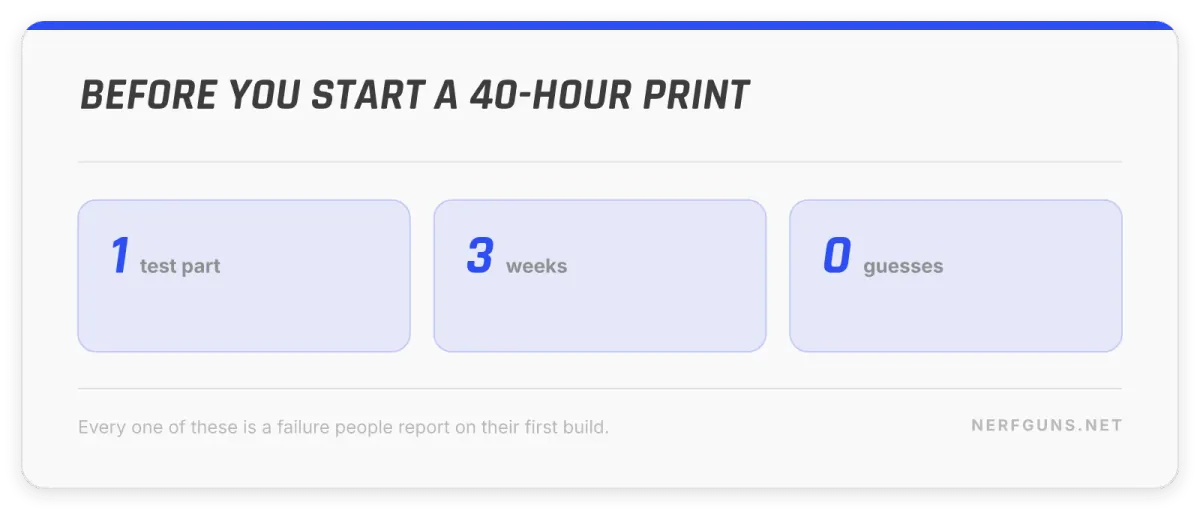
Tolerances that were fine on a keychain. 3D printed blasters need parts that slide against each other for tens of thousands of cycles. A printer that is 0.2mm out will produce a bolt that binds, and you will blame the design. Print the small test part first and measure it.
Under-specified filament. Basic PLA prints beautifully and then creeps under sustained spring pressure. Structural parts want the material the designer named.
The hardware arriving last. This is the most common one and the most avoidable. People start a multi-day print, then discover the springs are on a 3-week shipment. Order hardware before you start printing.
Building to no particular limit. A blaster built without checking the local fps cap is a blaster that gets turned away at the door. Decide what it is for before you choose the spring.
If you are starting this week
The order that wastes the least money on your first 3D printed blaster:
- Pick the design first, not the printer. Read its documentation completely, including the hardware list, before buying anything.
- Check your local field’s fps limit if you intend to play with it. That decides the spring.
- Buy the hardware as a kit for your first build. Source loose parts on the second one, once you know what the parts are.
- Print a small test part first. One bracket tells you whether your printer and filament can hold the tolerances the design needs.
- Print the big structural parts last, when your settings are proven. A failed 20-hour print is how people quit.
And if this all sounds like more project than you wanted, that is a completely reasonable conclusion. Go back to the mods guide, fit a spring and pull the air restrictors, and you will get a real improvement out of a blaster you already own in an afternoon.
Where to buy the gear
As an Amazon Associate I earn from qualifying purchases.
The community links above are unaffiliated and stay that way. For the general-purpose gear, printers, filament and the darts and magazines you will feed it, these are the searches worth running:
- 3D printers on Amazon
- PETG filament on Amazon
- Nerf magazines on Amazon
- N-Strike Elite 250-dart pack on Amazon
Hardware kits for a specific design are worth buying from the specialist shops listed above rather than a general marketplace, because they are packaged for the design you are actually building.
Frequently asked questions
Are 3D printed blasters legal?
3D printed blasters are built openly and their files are published openly, but rules vary by country and by state, and the specialist shops themselves put the responsibility on the buyer to check local law. Check your own jurisdiction before you build, and treat appearance and transport as part of that question rather than an afterthought.
Do I need to own a 3D printer?
Not necessarily. Several shops sell pre-printed part sets for popular 3D printed blasters, including the Caliburn, so you can buy the printed parts and the hardware and assemble them yourself. Owning a printer makes the second and third blaster far cheaper, and makes replacing a broken part trivial.
Are 3D printed blasters more powerful than Nerf blasters?
Generally yes, and that is the reason people build them. They are designed around stronger springs from the start rather than having one fitted afterwards. Actual performance depends entirely on the spring and the build, so treat any single number you read as that build’s result rather than the design’s guarantee.
Can I use my Nerf darts and magazines?
Usually yes. Most well-known 3D printed blasters deliberately feed standard Nerf magazines, which is a large part of why they caught on. Check the design’s documentation, because some are built around a specific magazine type.
What should I build first?
A springer, and most likely the Caliburn, because it is public domain, extremely well documented, and has the largest community to ask when something does not fit. Flywheel designs add motors, wiring and batteries to a job that is already unfamiliar.
How does this compare to just modding a blaster I own?
Modding is faster, cheaper and reversible, and for most people it is the right first step before trying 3D printed blasters. Printing is what you do when you want performance the original shell was never built to survive. Our Nerf gun mods guide covers the modding route in full, and the machine gun guide covers the fastest blasters Hasbro actually sold.