
The Nerf Chrome extension puts a blaster on your wish list from the shop’s own product page, in two clicks, with the name and picture already filled in.
It is live in the Chrome Web Store. Install NerfGuns.net Armory, free, and read the rest of this page whenever you like.
No account inside the extension, no card, and no signup required to read any of this.
What is on this page
- The problem it solves
- How the Nerf Chrome extension works
- Which shops it works on
- The one time setup
- The setup, step by step
- When something does not work
- What it collects, and what it does not
- Install it from the Chrome Web Store
- How it compares with a screenshot or a bookmark
- What comes after version 1.1.0
- The wish list works without it
- Why a browser extension is worth being careful about
- Who this is actually for
- Frequently asked questions
The problem it solves
A child finds the blaster they want. It is on some shop’s website, three tabs deep, and by the time anybody asks what it was called nobody remembers.
The usual fixes all fail in the same way:
- A screenshot. Lives in a camera roll, never gets found again
- A message to yourself. Buried under four hundred other messages by December
- A browser bookmark. Fine for you, useless to a grandparent
- Typing it into a list. Works, and nobody does it in the moment
The Nerf Chrome extension removes the typing. The item goes onto a shareable list from the page it was found on, while somebody is still looking at it, which is the only moment anybody reliably does this.
How the Nerf Chrome extension works
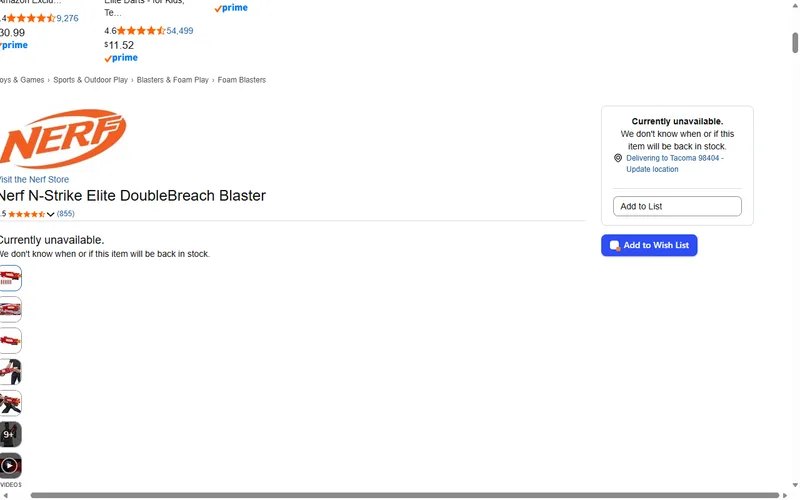
Open a product page at a supported shop. A blue “Add to Wish List” button appears next to the price.
Click it. You get to choose which list it goes on, add a note in your own words, and mark how badly it is wanted.
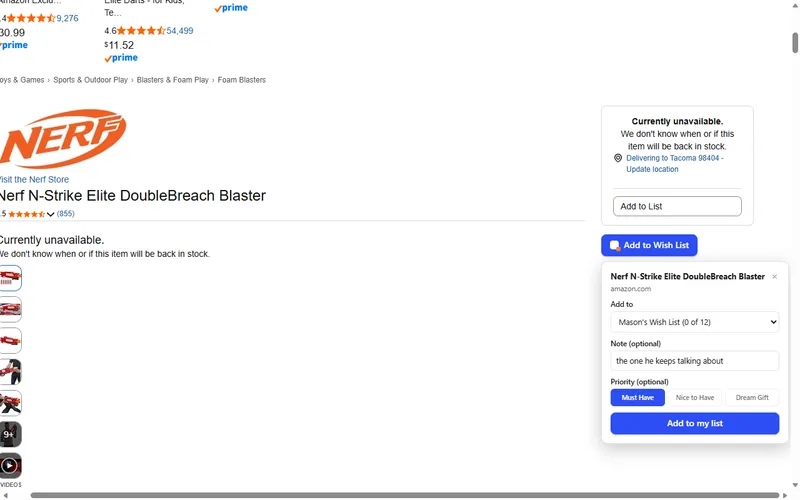
Three priorities exist, and they are the ones families actually use:
- Must Have. The thing they will be disappointed not to get
- Nice to Have. Good, not essential
- Dream Gift. The big one, for whoever wants to be the hero
On a page without the button, click the Armory icon in the toolbar, or right click and choose “Add to my Armory list”. Same result.
The item appears on your Nerf wish list straight away. The shopping link switches on once somebody here has checked it, which is deliberate rather than slow: an unchecked link is how a wish list sends a relative to the wrong product.
Which shops the Nerf Chrome extension works on
Five retailers are supported, chosen because they are where Nerf products are actually bought:
- Amazon
- Walmart
- Target
- Best Buy
- Hasbro Pulse
On any other site the toolbar icon and the right click menu still work, so nothing is locked out. The button in the page is what needs a supported shop, because it has to know where the price sits.
The one time setup
The Nerf Chrome extension needs two minutes of setup, once, and never again.
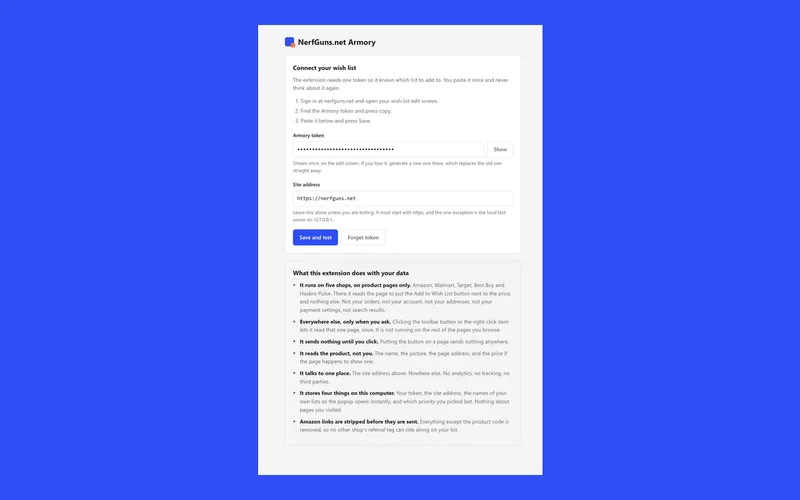
What you need:
- A free wish list on this site. No payment, no trial, no card
- A browser token. Made from your own list’s edit page, pasted into the extension once
That is the entire configuration. There is no account inside the extension, no separate password, and nothing to remember afterwards.
The setup, step by step
Five steps to a working Nerf Chrome extension, written out in full so nobody has to guess at a screen they have not seen yet.
1. Make a wish list. Open the wish list signup and pick a first name or handle, an email and a password. That is the whole form, and the list is live immediately.
2. Open your list’s edit page. This is the page you use to add and reorder items. It is where the browser token lives.
3. Make a browser token. One click. The token is what lets the Nerf Chrome extension write to your list and nothing else. It is not your password, and it can be replaced whenever you like.
4. Paste it into the extension. Click the Armory icon, open its options, paste the token, save. The extension checks it there and then, so you know immediately whether it worked.
5. Test it on a product page. Open any blaster at a supported shop and click the button. The item should appear on your list before you have switched tabs.
If step 5 works, setup is finished forever. Nothing expires on a schedule and there is nothing to renew.
When something does not work
Four things account for nearly every Nerf Chrome extension problem, and all four are quick.
The button does not appear on a product page. Check the shop is one of the five supported ones, then reload the page. Retailers change their page layouts regularly, and when the button vanishes on a whole shop it is usually that rather than anything on your side. Use the toolbar icon in the meantime, which does not depend on the page layout.
The item saves but shows no shopping link. Working as intended. Links switch on after a check here, which is what stops a list sending a relative to the wrong product.
It says the token is invalid. Make a fresh one on your list’s edit page and paste it again. Tokens are cheap and replacing one takes ten seconds.
It saved to the wrong list. The list picker remembers your last choice, which is convenient right up until it is not. Change it in the popup before you save the next item.
Anything else, tell us on the contact page. A bug report that names the shop and the blaster is worth ten that say it stopped working.
What it collects, and what it does not
Worth being specific about the Nerf Chrome extension, because “we collect nothing” is the claim every extension makes and most of them are wrong.
What it sends. When you click the button, it sends the product name, image and page address of the page you chose to your own wish list on this site. That is the whole transmission.
When it sends. Only after you click. It does not run in the background, and it does not watch pages you have not acted on.
What it stores locally. Your access token, the site address, the names of your own lists, and the priority you last picked. All of it stays in your browser.
Where it talks to. One server, nerfguns.net. There is no third party analytics, no advertising network and no data broker in this thing.
The full detail, in the form the Chrome Web Store requires, is on our extension privacy page.
Install the Nerf Chrome extension
It passed review and it is published. The listing is NerfGuns.net Armory, version 1.1.0, and it costs nothing.
Install NerfGuns.net Armory from the Chrome Web Store →
What happens when you click that:
- Chrome lists the permissions first. Five shops plus this site, and nothing else
- The Armory icon lands in your toolbar. That is the whole install
- You paste one token from your own list, once, using the steps above
- Nothing runs until you click it. Not on a shop page, not anywhere
Two minutes of setup and the Nerf Chrome extension is done. If you would rather see the rest of the page before you install anything, that is the sensible order and the link is still here when you come back.
The Nerf Chrome extension against the alternatives
There are four ways families handle this, and it is worth being honest about where the Nerf Chrome extension actually helps.
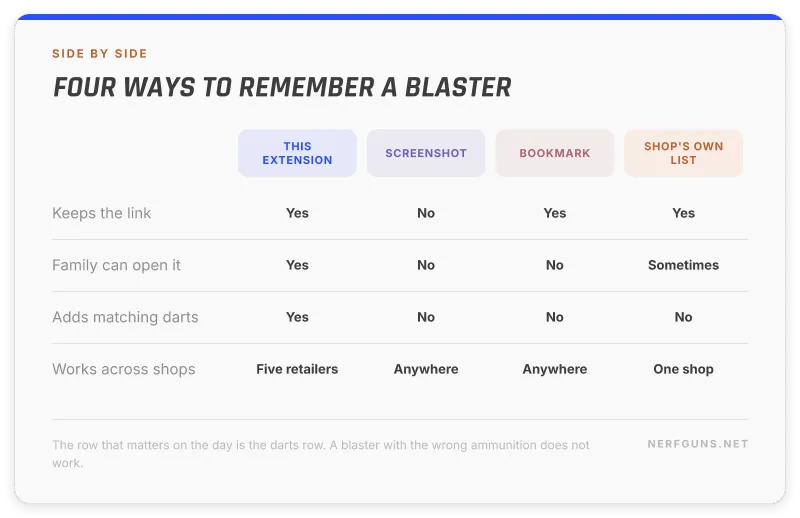
Against a screenshot. A screenshot keeps the picture and loses the link, the price and the exact model. It also lives somewhere nobody else can see. The extension keeps all three and puts them on a page you can send.
Against a bookmark folder. Bookmarks are private to one browser on one machine. A wish list is a web address anybody can open, which is the entire point when the buyer is a grandparent on a tablet.
Against typing it into the list by hand. This works perfectly and almost nobody does it, because the moment of wanting something and the moment of sitting down to type are half an hour apart. The extension collapses that gap to two clicks.
Against a retailer’s own wish list. Tied to that one shop, and it does not know that a blaster needs matching darts. Our list adds the right ammunition automatically, which is the mistake that ruins the actual day.
The honest summary: the extension is a convenience layer on a list that already works. If you are the kind of person who will happily type six items into a page, you do not need it at all.
What comes after version 1.1.0
Two things are on the list, and neither one carries a date, because a date on a free tool is a wish rather than a plan.
More shops. Five retailers cover most Nerf buying, and the sixth and seventh are worth adding when there is evidence people shop there for this.
A claimed marker. So a family can mark an item as bought without telling everybody in the group chat. That is a wish list feature rather than a Nerf Chrome extension feature, and it helps the same person either way.
What is deliberately not on the list: accounts inside the extension, tracking of any kind, and anything that runs when you have not clicked. Those are the three things that turn a small useful tool into something nobody trusts.
The wish list works without it
The wish list runs on its own and it does not need the Nerf Chrome extension at all. Worth knowing before you install anything.
Build the list from the catalogue. Open the full catalogue of Nerf guns and add anything worth having. The matching darts and batteries go on automatically, which is the part that saves the day.
Send one link. Family open it, tap through, buy the normal way. No account at their end.
Check compatibility before you add. If you are unsure what a blaster takes, the dart compatibility checker covers 628 models across five brands.
The extension makes an existing list faster to fill. It is not the thing that makes the list work.
Why a browser extension is worth being careful about
A Nerf Chrome extension, or any other, gets more access to your browsing than almost anything else you install, so scepticism is the right starting position. Four questions are worth asking of any of them, including this one.
What sites can it read? This one names five retailers plus its own backend. That list is in the manifest, and Chrome shows it to you at install time.
When does it run? Only after a click. An extension that runs on every page you visit is a different category of thing, whatever its description says.
Where does the data go? One server here. No analytics service, no advertising network, no third party at all.
What happens if you remove it? Nothing on your list changes. The list lives on the site, not in the browser, so uninstalling costs you nothing but the shortcut.
One more worth knowing: an extension can be updated after you install it, and permissions can grow with an update. Chrome asks again when they do, which is a prompt worth actually reading rather than clicking through.
Ask those four of anything you install. Most extensions that get pulled from the store fail the second and third questions, and both are answerable before you click install.
Who this is actually for
Three people get real value from a Nerf Chrome extension like this one, and it is worth knowing whether you are one of them before waiting for it.
The parent who does the buying. You are the one who ends up with fourteen tabs open in October. Two clicks per blaster beats reconstructing the list from memory in December.
The player old enough to browse. A child with their own list adds what they actually want, which removes the guessing entirely and removes the conversation where they are too polite to say the present was wrong.
The person running a group buy. Kitting out a party or a war means comparing the same blaster across five shops. Saving each candidate as you go, with a note, turns that into a list you can decide from later.
Who it is not for: anybody who happily types six items into a page in one sitting. The list works perfectly without any of this, and the extension only ever removes typing.
Frequently asked questions
Is the Nerf Chrome extension available now?
Yes. It is live in the Chrome Web Store as NerfGuns.net Armory, version 1.1.0, free. Install it, paste one token from your own list, and you are set.
How do I know I have the right one?
Check the publisher on the listing. The name is NerfGuns.net Armory and the publisher is NerfGuns.net. Anything with a similar name under a different publisher is not ours, and we would want to hear about it on the contact page.
Does it cost anything?
No. The Nerf Chrome extension is free and the wish list it feeds is free. There is no paid tier on either.
Which browsers does it support?
Chrome, which is what it is built and packaged for. Anything beyond that would be a separate build and a separate store listing, and we would rather ship one properly than promise four.
Do the people I share my list with need it?
No. The Nerf Chrome extension is for the person building the list. Anybody you send the link to just opens a web page and buys the ordinary way.
Can I add things from a shop that is not on the list?
Yes, using the toolbar icon or the right click menu. The in page button is the part that needs a supported shop.
What happens to the link on my list?
It switches on once it has been checked here. That check is what stops a wish list pointing a relative at the wrong product, which is the failure this whole system exists to prevent.
Will it work on a phone?
No. Chrome extensions do not run on Chrome for Android or iOS, so the Nerf Chrome extension is a desktop and laptop tool. On a phone, add items to the list through the site itself, which works fine on a small screen.
Does it need my nerfguns.net password?
No. It uses a browser token you generate from your own list, which can be replaced at any time and gives access to nothing except adding items to your list.
What happens if I uninstall it?
Your list is untouched. Everything already saved stays exactly where it is, because the list lives on the site rather than inside the browser.
How do I hear about the next tool?
Leave your email below. The Nerf Chrome extension going live was one of the two things that list exists to announce, and the next free tool is the other.
Want the next guide?
Our guides and calculators are free and there are more coming. Leave your email and we will tell you when the next one lands. That is all it is for.