
Six free Nerf calculators, all of them running in your browser with nothing to sign up for and nothing stored. These are the Nerf calculators we use ourselves before a build or an event. Each one answers a question that otherwise costs you money or an afternoon: which darts fit, how hard your blaster hits, what velocity a joule cap allows, what a spring swap will chrono, whether a battery can feed your motors, and how many packs a war needs.
What is on this page
- Which Nerf calculator do you need?
- Dart compatibility checker
- Kinetic energy calculator
- Joules to FPS calculator
- Spring FPS estimator
- LiPo battery calculator
- Battery runtime estimator
- The three numbers everything runs on
- A worked example: box to event legal
- The mistakes these Nerf calculators catch
- What you need before you start
- FPS caps and joule caps are different tests
- How these Nerf calculators are built
- Where each tool stops being certain
- Who each tool is for
- Frequently asked questions
Which Nerf calculator do you need?
Most people arrive with one of 6 questions. Match yours to the calculator:
| Your question | The tool |
|---|---|
| Which darts fit my blaster? | Dart compatibility checker |
| How hard does my blaster actually hit? | Kinetic energy calculator |
| What velocity does my event’s joule cap allow? | Joules to FPS calculator |
| What will that upgrade spring chrono? | Spring FPS estimator |
| Will this battery safely run my motors? | LiPo battery calculator |
| How many battery packs does a war need? | Battery runtime estimator |
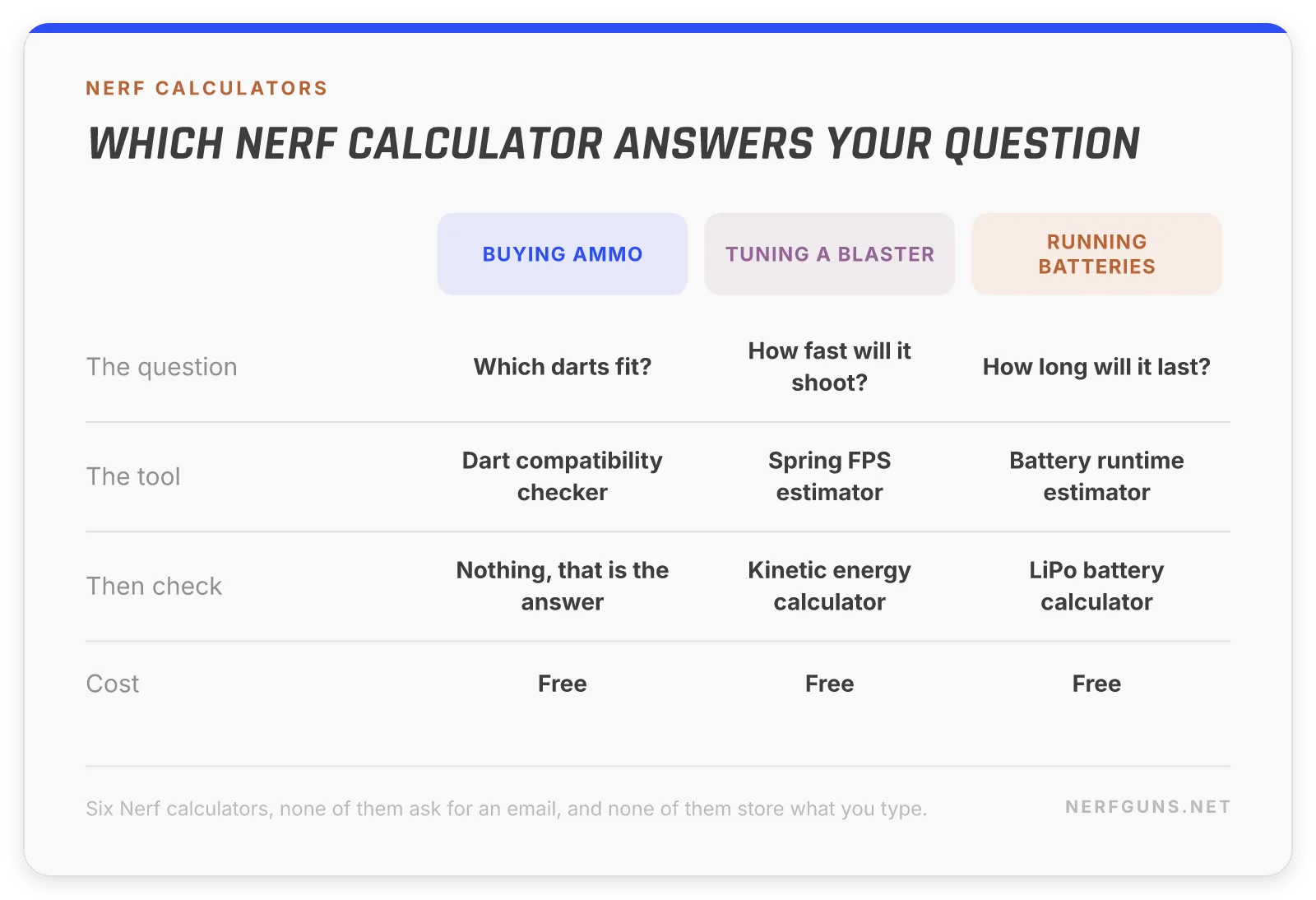
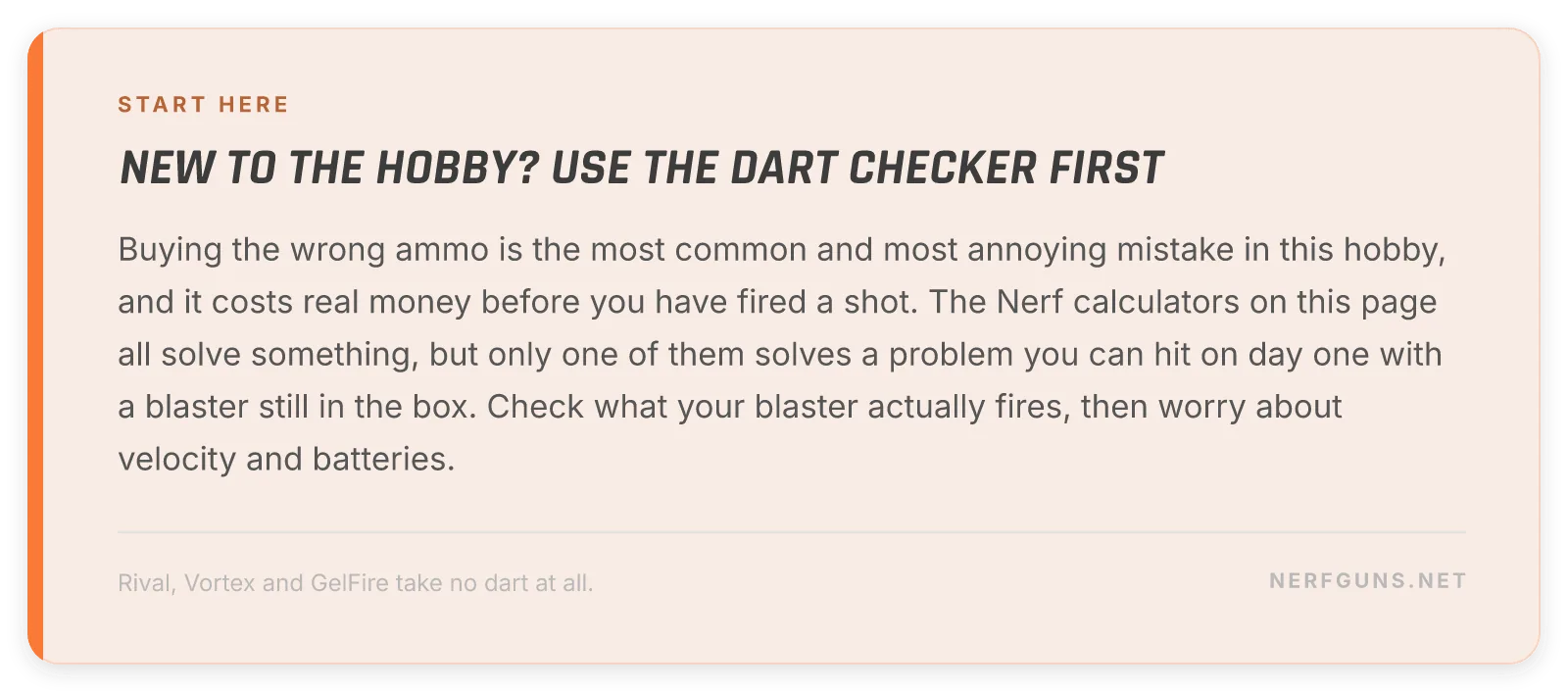
New to the hobby? Of the six Nerf calculators here, start with the dart compatibility checker. Buying the wrong ammo is the most common and most annoying mistake, and it costs real money before you have fired a shot.
Dart compatibility checker
Type your blaster and get the ammo that fits, the ammo that does not, and the reason why. It covers 628 blasters across Nerf, X-Shot, Dart Zone, Adventure Force and Buzz Bee, and if yours is not listed there is a fallback that asks what the blaster fires instead, so you always get an answer.
The one it exists for: Nerf Rival fires foam balls and no dart of any kind fits it. That mistake gets made constantly, because Rival sits on the same shelf under the same logo with nothing on the box to warn you.
Kinetic energy calculator
Dart weight plus velocity, in joules
Enter your dart weight and muzzle velocity and get kinetic energy in joules, checked against example field caps. Useful because a growing share of events cap joules rather than FPS, and the two are not interchangeable: a heavy dart can pass an FPS cap and fail a joule cap at the same velocity.
Joules to FPS calculator
Your maximum legal velocity for a given joule limit
The same relationship worked backwards. Give it your event’s joule limit and your dart weight, and it returns the highest velocity you can run and still be legal. This is the one to use when you are tuning a blaster before an event rather than checking one afterwards.
Spring FPS estimator
What will that spring actually chrono?
Spring rate and plunger travel in, likely muzzle velocity out.
It gives you a range across 3 efficiency bands rather than one confident number, because efficiency is the one input nobody can measure at home and it moves the answer more than the spring does.
LiPo battery calculator
Can this pack safely feed your motors?
Motor setup, capacity and C rating go in, safe continuous current and a verdict come out. LiPo packs are the most common upgrade in the hobby and also the one with a real safety floor, so knowing whether a pack is being asked for more than it can give is worth the thirty seconds.
Battery runtime estimator
Capacity, average draw and duty cycle give you a run time and the number of packs a session actually needs. The answer is usually more than people expect, because a flywheel blaster spends far more time spun up than it spends firing.
The three numbers everything runs on
Every rule sheet in this hobby is built on three numbers. Learn them once and every one of these Nerf calculators gets easier to read.
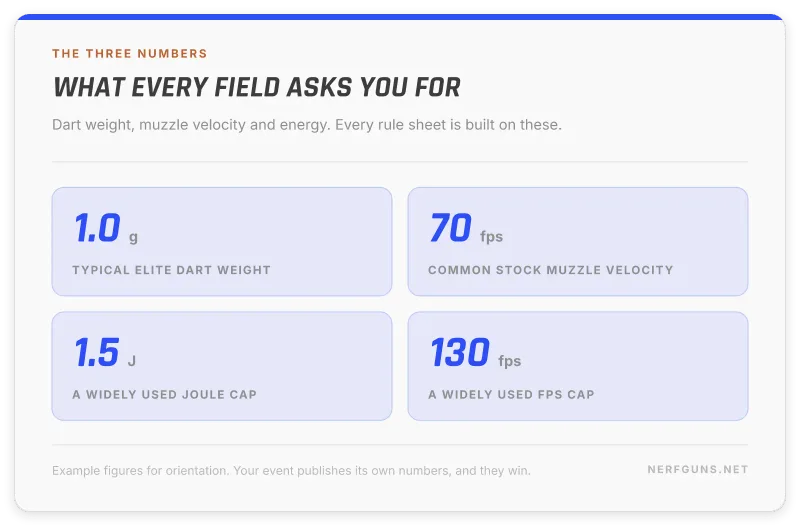
Dart weight, in grams. The input people skip. Darts are sold by count, not by mass, and weights drift between brands and batches. A 0.01 g scale settles it in a second.
Muzzle velocity, in feet per second. What a chronograph reads at the barrel. Box claims are marketing, and a well used blaster rarely matches the number on the packaging.
Energy, in joules. Not measured, calculated. It comes from the first two, and it is the number that describes what actually lands on somebody.
Three notes worth carrying:
- Weight and velocity are inputs. Energy is an output, so a wrong weight quietly produces a wrong verdict
- Velocity changes with the dart. A heavy dart leaves the same blaster slower than a light one
- Fields cap either number. Which one they cap decides which tool you open first
A worked example: box to event legal
Here is the whole run, in the order it actually happens. One blaster, one weekend, six Nerf calculators.
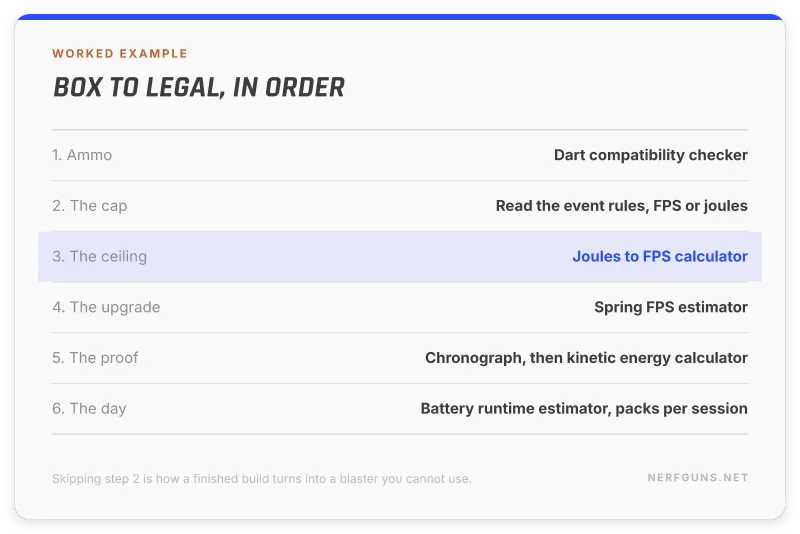
Step 1. Buy the right ammo. Run the blaster through the dart compatibility checker before ordering anything. This is where the Rival mistake gets caught.
Step 2. Read the rules. Find out whether your event caps FPS or joules, and at what number. Everything downstream depends on this one line of the rule sheet.
Step 3. Find your ceiling. If the cap is in joules, the joules to FPS calculator converts it into the velocity you are allowed to run with your dart weight.
Step 4. Plan the upgrade. Thinking about a spring? The spring FPS estimator gives you three likely outcomes instead of one optimistic one.
Step 5. Prove it. Chronograph the blaster, then confirm with the kinetic energy calculator. A calculated number is a plan. A chrono reading is evidence.
Step 6. Survive the day. The battery runtime estimator tells you how many packs a full session eats, which is almost always more than people bring.
Skip step 2 and you can do everything else perfectly and still get turned away at the chrono table.
The mistakes these Nerf calculators catch
Every one of these Nerf calculators exists because somebody paid for the lesson first.
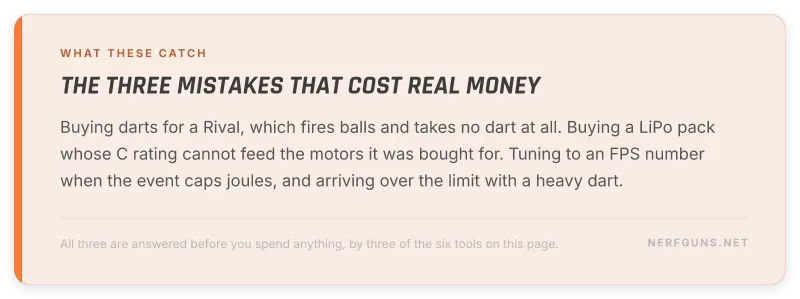
Buying darts for a blaster that takes no darts. Rival fires high impact rounds. Nothing on the shelf warns you, and the fix is a single search in the compatibility checker.
Buying a battery the motors cannot use. A pack rated below what a motor pair draws runs hot, sags under load and dies early. The LiPo battery calculator answers it before the pack ships.
Tuning to the wrong test. A heavy dart can pass an FPS cap and fail a joule cap at the same velocity. If the rule sheet says joules, tune to joules.
Bringing one battery to a six hour war. A flywheel blaster spends most of its day spun up rather than firing, and that is where the charge goes.
What you need before you start
Most of these Nerf calculators need nothing but numbers you already have.
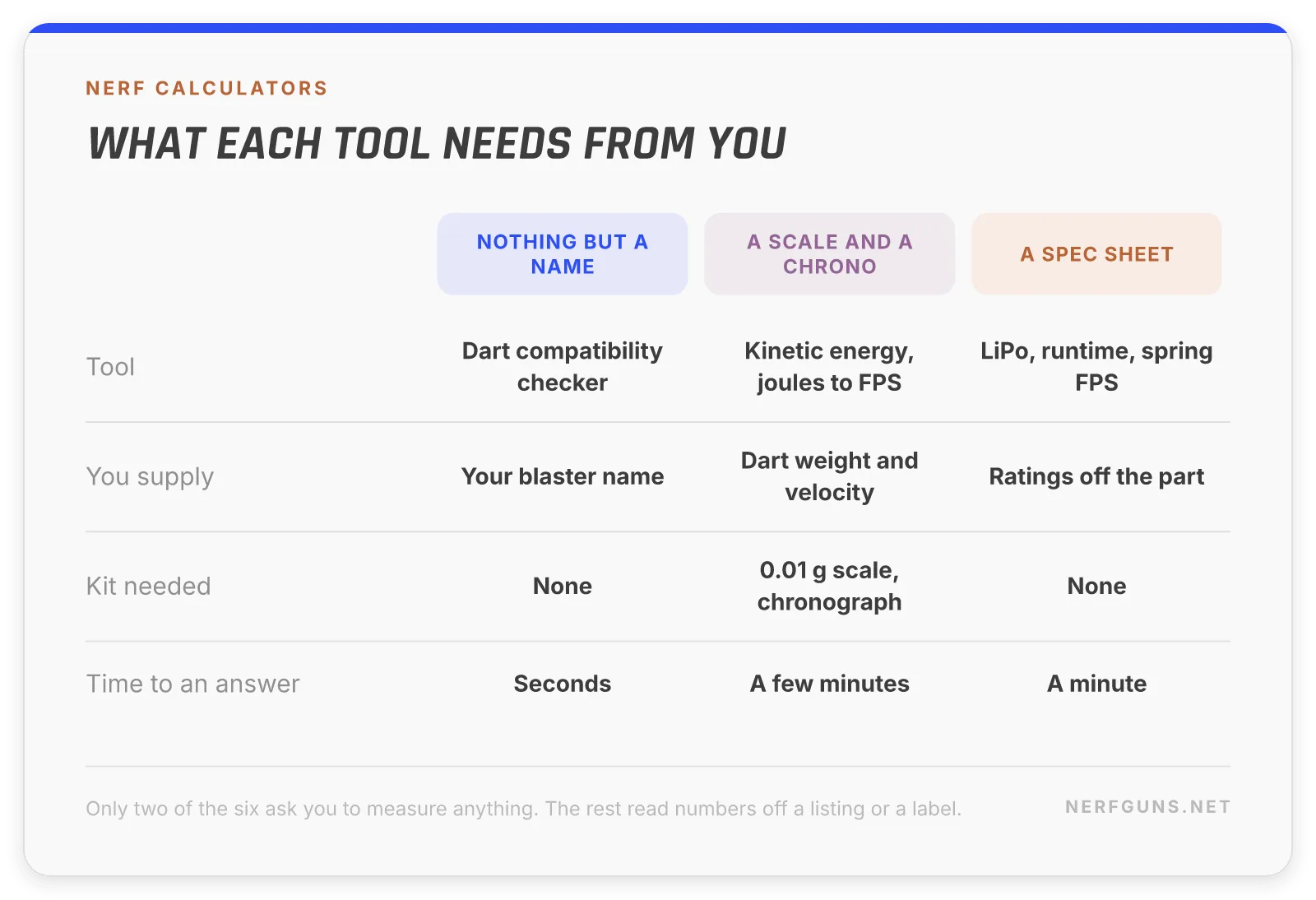
Two of them are different, and it is worth knowing which before you trust an answer.
- A 0.01 g scale. Dart weights vary between batches, and both energy tools take weight as an input. A scale costs less than a spring kit
- A chronograph. The only way to know your real muzzle velocity. Many clubs have one you can borrow on the day
Without those two, the energy tools still work. You are just feeding them typical values rather than your values, and the answer inherits that.
Everything else reads off a label: spring rate from the listing, mAh and C rating from the pack, plunger travel from the blaster itself.
FPS caps and joule caps are different tests
This trips up more people than anything else on this page, so it gets its own section.
FPS measures speed. Joules measure energy. A heavier dart at the same speed carries more energy, so it can pass an FPS cap and fail a joule cap in the same breath.
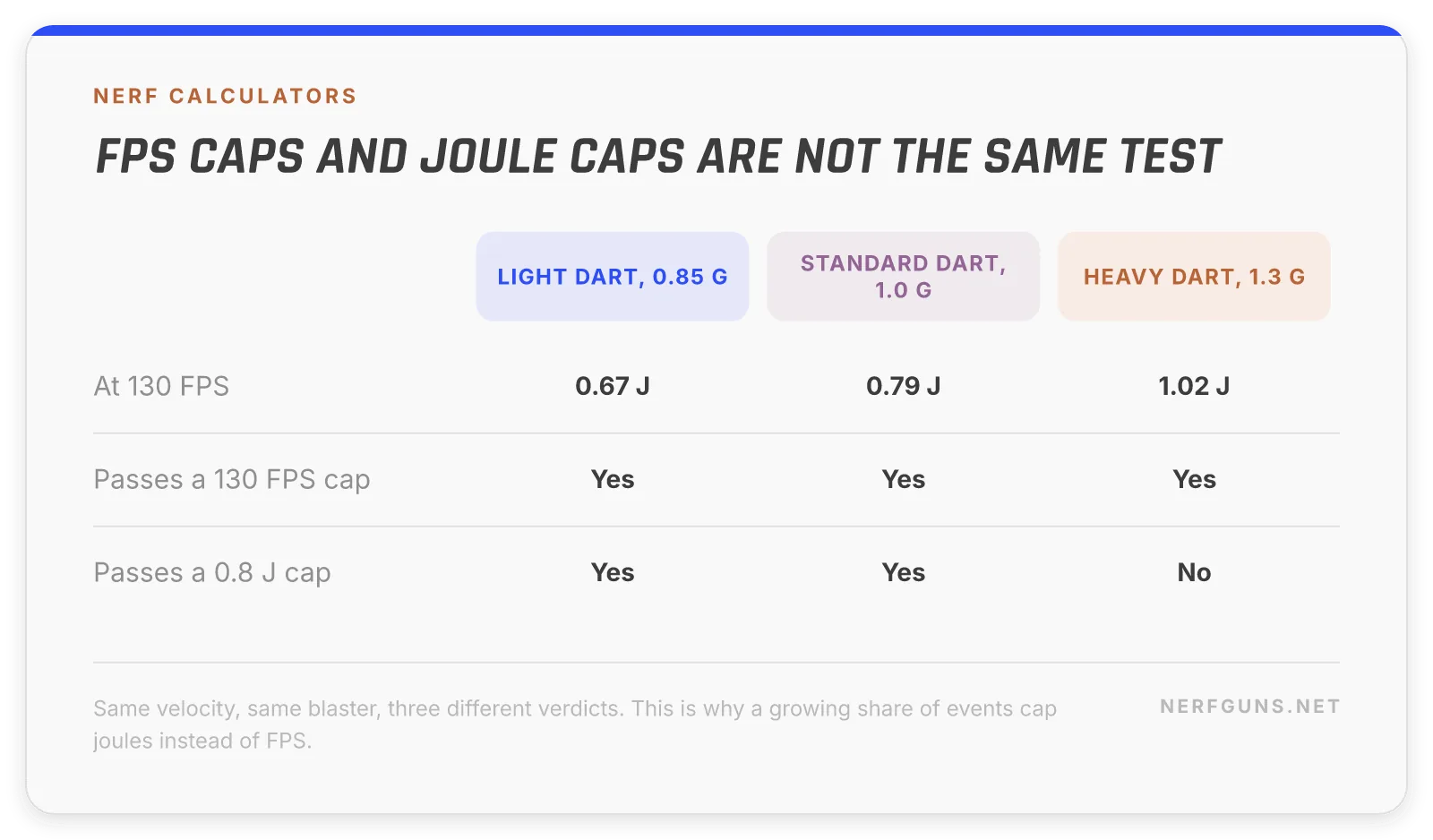
Which is why a growing share of events cap joules. It is the number that actually describes what hits somebody.
The order to work in:
- Find out which your event caps, and at what number
- If it is joules, use the joules to FPS calculator to get your ceiling for your dart weight
- Tune, then chrono
- Confirm with the kinetic energy calculator
How these Nerf calculators are built
All 6 Nerf calculators run entirely in your browser. That is a deliberate design choice, not a shortcut.
- Nothing is sent anywhere. No server sees what you type
- Nothing is stored. Close the tab and it is gone
- No signup, no paid tier, no trial
- Every tool shows its formula as you type, so you can check the arithmetic yourself
The maths is exact. The inputs are where uncertainty lives, and each tool says so on its own page rather than hiding it.
The dart compatibility data comes from the community Nerf wiki, the most complete public record of what has been released. Blasters whose ammo could not be established from that record were left out rather than guessed at.
Where each tool stops being certain
Nerf calculators that pretend to more precision than they have are worse than none at all. Here is where each one runs out:
- Dart compatibility. Third party darts of the right size usually work, but foam varies by brand. Test 1 pack
- Kinetic energy. Exact, given your inputs. Dart weights vary between batches, so weigh yours
- Joules to FPS. Same, inverted. Your event’s measuring method may differ from yours
- Spring FPS. The efficiency band is a guess, and it moves the answer more than the spring does
- LiPo battery. C ratings are manufacturer claims and often optimistic
- Battery runtime. Duty cycle is your estimate of your own play style
Bottom line: use these to choose between options. Measure before anything matters.
Who each tool is for
Not everybody needs all 6 Nerf calculators. Pick by what you are about to do.
Just bought a blaster. The dart compatibility checker, and nothing else yet.
Playing at an organised event. Kinetic energy and joules to FPS. Your event has a cap and you need to be under it.
Modifying a blaster. Spring FPS estimator first, then kinetic energy to check what you actually got.
Running a flywheel blaster. Both battery tools. LiPo for safety, runtime for how many packs to bring.
Running a party or a war. Dart compatibility to buy ammo in bulk, and battery runtime so the blasters last the day.
Why these Nerf calculators are free, and stay free
Worth saying plainly, because free tools usually have a catch waiting somewhere.
There is no paid tier. Not now and not later. These Nerf calculators are not a trial of anything, and no answer is held back behind a signup box.
Your inputs never leave the browser. Nothing is posted to a server, so there is no account, no profile and nothing to leak.
The site earns elsewhere. Our reviews and buying guides carry affiliate links, which is what pays for building Nerf calculators nobody charges for. That arrangement only works if the tools are actually right, so the incentive points the same way you do.
The one thing we ask is optional. If you want to hear when the next tool lands, the email box at the bottom of this page does exactly that and nothing else.
What we are building next
The list of Nerf calculators grows when a question keeps coming back. Three are queued:
- A flywheel motor picker. Cage, motor and cell count in, likely velocity out
- A dart cost per shot tool. Bulk pack pricing against how many darts a war actually loses
- A spring compression calculator. Draw length against the force it takes to prime, which is the number that decides whether a build is playable for a child
If you want a calculator that is not here, say so. The queue is built from what people ask for.
Frequently asked questions
Are these Nerf calculators free?
Yes. All 6 Nerf calculators are free, none of them ask for an email, and none of them have a paid tier.
Do they store what I enter?
No. Every calculator runs entirely in your browser. Nothing you type is sent anywhere and nothing is saved.
Do I need to install anything?
No. These Nerf calculators are ordinary web pages and they work on a phone.
Which Nerf calculators do modders use most?
The spring FPS estimator and the kinetic energy calculator, in that order. One predicts what a build will do, the other proves what it did.
How accurate are the results?
The arithmetic is exact and each tool shows its formula so you can check it. The inputs are where the uncertainty lives: dart weights vary between batches, chronographs disagree with each other, and battery capacity ratings are optimistic. Treat the outputs as good estimates, and chrono on site when an event’s rules are what matter.
Which calculator should I use for a joule capped event?
Use the joules to FPS calculator to find your ceiling before you tune, then the kinetic energy calculator to confirm where you actually landed.
Do I need a chronograph to use these?
No. Four of the six need nothing you cannot read off a label or a listing. A chronograph only matters when you need your real muzzle velocity rather than a typical one, and most clubs have one you can borrow on the day.
Why does the spring estimator give three answers?
Because efficiency cannot be measured at home, and it moves the result more than the spring does. One number would look confident and be wrong. Three bands show you the range your build is likely to land in.
Can I use these for X-Shot, Dart Zone or Buzz Bee blasters?
Yes. The physics tools do not care about the badge, and the compatibility checker covers 628 blasters across five brands including a full Dart Zone catalogue.
My blaster is not in the compatibility checker. What now?
Use the ammo type picker below the search box on that page. Ammo is determined by the product line rather than the individual blaster, so picking what it fires gets you a correct answer even when the exact model is not listed.
Want the next tool?
Our calculators are free and there are more coming. Leave your email and we will tell you when the next one is ready. That is all it is for.